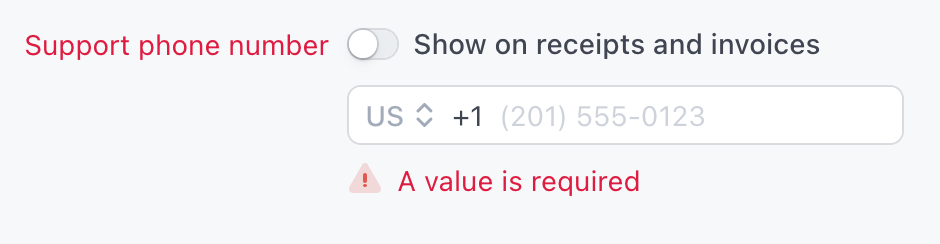
Stripe's support phone number setting showing "A value is required" even with the "Show on receipts and invoices" toggle turned off

Stripe requires a phone number. It doesn't have to be yours.

ZebraFone gives you a dedicated number to use with Stripe. Your personal number never appears on a customer's bank statement.

🔒 Personal number stays completely private

☎️ Custom greeting tells callers who you are — without you picking up

✍️ Voicemails transcribed and sent to your inbox

Get My Stripe Number

ZebraFone is a billing-descriptor phone number service. It gives you a dedicated US or Canada number for Stripe, so the phone number on your customers' bank statements is never your personal one.

Removing your phone number from Stripe receipts doesn't remove it from bank statements

Stripe has a "show phone number on receipts" toggle. A lot of people turn it off and assume that's the end of it.

It's not. North American Stripe accounts are required to send a customer support phone number with every transaction at the card-network level, so it can land on your customers' bank statements no matter what your settings say. Customers who tap a charge can see it. Banks see it when a dispute is filed.

The only real fix is a number that isn't yours.

Set up in minutes. Forget about it forever.

Step 1 — Choose your number

Pick a local or toll-free number. Both work with Stripe.

Step 2 — Write your greeting

Type what you want callers to hear. ZebraFone reads it to them automatically — no recording needed.

"Thanks for calling Acme Co. If you're calling about a charge on your bank statement, this is for your monthly subscription to our starter plan. If you need help, leave a message and we'll get back to you within 24 hours."

Step 3 — Update Stripe

Add your ZebraFone number in Stripe Dashboard → Settings → Business Profile. That's it.

From now on, customers who call hear your greeting and can leave a voicemail if they need help. You get it transcribed and delivered to your inbox.

🔒 Your personal number, off limits

Stripe sends your support number with every transaction at the card-network level, so it can appear on customer bank statements even when you've turned it off in settings. ZebraFone gives Stripe what it needs without that number being yours.

🛡️ Fewer chargebacks, less explaining

When a customer sees an unfamiliar charge, they call the number on their bank statement. Your ZebraFone greeting tells them who you are and what they were charged for — before they call their bank instead.

📵 No surprise calls on your personal phone

Your ZebraFone number answers with your custom greeting around the clock. Voicemails are transcribed and sent to your inbox — respond when it suits you, not when a call interrupts you.

Less than what one chargeback costs you

One flat annual fee. All features included.

Local Number

$48 / year
  • 📍 Local phone number (US & Canada)
  • 🗣️ Custom greeting for your business
  • ✍️ Voicemails transcribed and emailed to you
  • 🔒 Your personal number stays private
  • 🔁 Renews annually, cancel any time
Get My Local Number

Toll-Free Number

$72 / year
  • 👔 Premium toll-free number (US & Canada)
  • 🗣️ Custom greeting for your business
  • ✍️ Voicemails transcribed and emailed to you
  • 🔒 Your personal number stays private
  • 🔁 Renews annually, cancel any time
Get My Toll-Free Number

Frequently asked questions

Does turning off "show phone number on receipts" in Stripe hide my number?

No. That toggle only controls receipts and invoices. North American Stripe accounts are required to send a customer support phone number with every transaction at the card-network level, so it can still appear on customers' bank statements regardless of the setting. The only way to keep your personal number private is to give Stripe a number that isn't yours.

Why does Stripe require a phone number at all?

Card networks require an active business to provide a customer support contact so cardholders can reach the merchant about a charge before disputing it with their bank. Stripe passes that requirement on to you, and makes it a required field you can't leave blank. It doesn't have to be your personal number, though.

Nobody ever calls the number. Do I really need this?

Even if calls are rare, the number is still printed on every customer's bank statement. It only takes one confused customer at 2am, or one who disputes a charge instead of calling, to make it matter. The privacy risk exists whether or not the phone rings.

Will my ZebraFone number work as my Stripe support phone number?

Yes. It's a real, dialable US or Canada phone number that satisfies Stripe's business profile requirement, and a VoIP number is accepted for that field. You add it in Stripe Dashboard → Settings → Business Profile. This is the customer support number on your business profile, which is separate from any phone verification Stripe may ask for when you first open your account.

How do I add my ZebraFone number to Stripe?

Three steps. First, sign up and pick your ZebraFone number, local or toll-free. Second, write your greeting, which ZebraFone reads to callers automatically so there's nothing to record. Third, in Stripe go to Dashboard → Settings → Business Profile and enter your ZebraFone number as the support phone number. From then on that's the number on your customers' statements, not your personal one.

How much does ZebraFone cost?

$48/year for a local US or Canada number, or $72/year for a toll-free number. One flat annual fee, all features included, cancel any time. That's less than a single chargeback's dispute fee and lost sale.

Do I need to install an app or get a second SIM?

No. There's no app and no second SIM. Callers hear a custom greeting you write (ZebraFone reads it aloud automatically, no recording needed), and any voicemails are transcribed and emailed to you.

Your personal number shouldn't be on a stranger's bank statement.

Get a dedicated Stripe number in minutes.

Get My Stripe Number

Copyright © 2026 Code Rivage LLC. All rights reserved.